A quick post today covering an issue that I’ve observed coming up a lot recently, which is catching engineers out, leading to deployment issues and poor user experience.
The 9166 AP behaves a bit differently from other models in that when it’s operating in a country where 6GHz has not yet been approved, obviously the 6GHz radio can’t be enabled, but it’s the behavior of the radio that catches people out.
From the 9166 datasheet: Note: In countries where the use of the 6GHz band is not allowed or authorized or if there is no current software support, the 6GHz radio will be disabled and will switch to 5GHz and operate as a dual 5GHz access point. The 6GHz radio may be enabled with future software, once the product is certified to operate at 6GHz for that country.
This means that if you deploy a 9166 in Australia (or a lot of other APJC countries) with the 9800 WLC running the 17.9.x release, then the default behavior for radio 2 is to operate as a second 5GHz radio. Unlike the older models where running dual 5GHz APs meant that you ended up with a Macro/Micro cell, on the 9166 it actually runs as a Macro/Macro.
This is where a lot have come unstuck as they didn’t realize this to be the case, haven’t done or haven’t yet done a post-install site survey, and clients are experiencing a high amount of CCI.
What’s more, from what I’ve seen, the RRM engine seems to love to pick channel 149 for a lot of devices for Radio 2, which is generally where the CCI issues have come about.
In order to maintain separation and avoid CCI on the AP between the radios when operating in dual 5GHz mode, Radio 1 is band-locked to only operate in the UNII1 & 2 bands (channels 36-64), and Radio 2 can only operate on the UNII2E & 3 bands (channels 100-165).
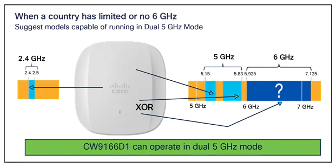 This is also an important consideration as we are now doubling the number of radios in the environment from what was originally planned (you did do a design right?).
Furthermore, if you are running 17.9.x SW and think that you can just disable Radio 2 on all the 9166 APs, then you won’t be gaining much at all, as in this mode, Radio 1 is still band-locked to the lower channels.
Even though 6GHz use has been approved for Australia, this was only enabled in 17.12 and onward and isn’t backported to older releases. To review the channels that are supported for the current release, you can check on the controller with:
show wireless country channels
The other reference is the detailed Channel and Max Power settings tables per AP model, but I find the command above an easier reference to follow.
Upgrading to 17.12.x, where 6GHz is then permitted for Australia, allows Radio 2 to be enabled for 6GHz (regardless of whether you are actually using it or not, you can still have Radio 2 in the shut state), and it also frees up Radio 1 to operate across UNII 1/2/2E/3 bands as it’s no longer band-locked.