Navigating the 6GHz Spectrum: Understanding Preferred Scan Channels (PSC)
I feel like I’m late to the party with 6E, but in reality, not having 6GHz approved for use in Australia for so long has just meant that there is more real-world experience to learn from that others have already gone through when it comes to discovering 6E networks.
With the introduction of the 6GHz band, Wi-Fi technology continues to evolve, offering faster speeds and reduced congestion. However, discovering 6GHz networks requires a new approach, and that’s where Preferred Scan Channels (PSC) come into play. This is actually the only method by which Wi-Fi 6E client devices are allowed to send probe requests when searching for 6GHz networks.
The concept of PSC is rooted in the 802.11ax (Wi-Fi 6) standard, which has been extended to support the new 6GHz band under 802.11ax-2021. PSCs are specific channels that clients scan to discover available networks efficiently, theoretically significantly reducing the time it takes to connect.
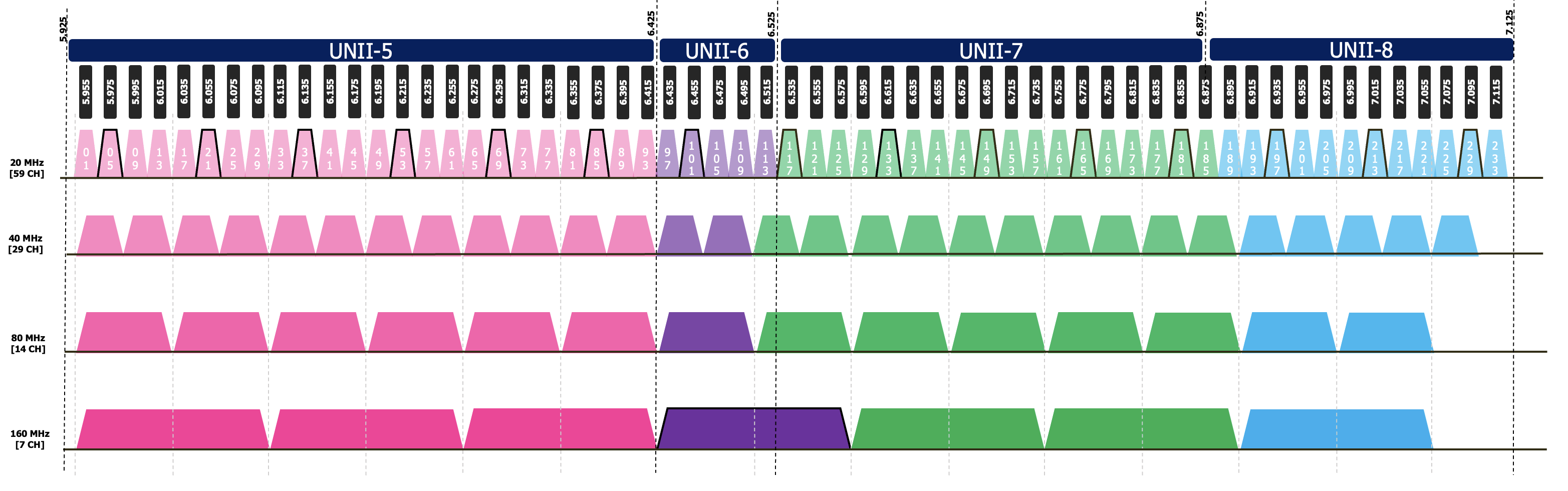
Imagine you’re setting up a large office space with a 6GHz network. Traditionally, clients would need to scan a wide range of channels, but with PSCs, they focus only on predetermined channels (highlighted in black above) for channels 5, 21, 37, 53, 69, 85, 101, 117, 133, 149, 181, 197, 213, and 229. This assumes that the region you are in has approved the full 1200MHz; otherwise, there will only be a subset of the spectrum available, generally only UNII-5.
This not only speeds up the discovery process but also conserves battery life—crucial for battery-powered devices. As you can see above, though, PSC really only helps when using 80MHz or wider channels; if you are using smaller channels, then PSC might yield undesirable results.
PSC Configuration
The 802.11ax standard specifies that these PSCs are spaced 80MHz apart (every fourth 20MHz channel), starting from the lowest channel in the 6GHz band based on the current regulatory domain. This spacing helps streamline the scanning process, as devices need only check these specific channels to find available networks.
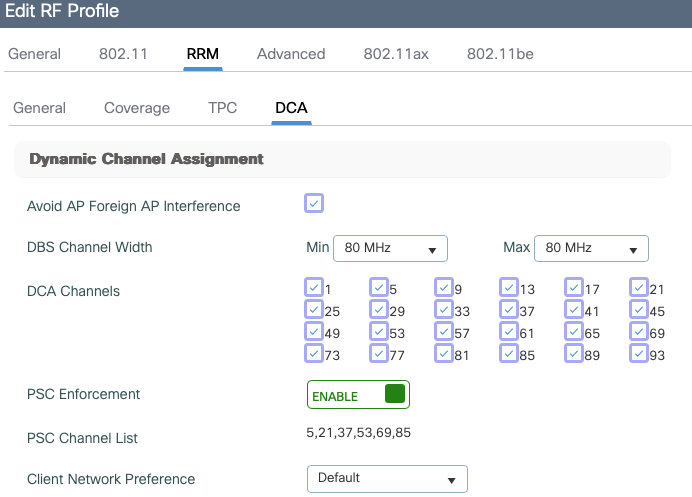
Enabling PSC is a very straightforward task via either the GUI or the CLI, and it’s all done via the RF Profile.
9800-CL#conf t
Enter configuration commands, one per line.  End with CNTL/Z.
9800-CL(config)#ap dot11 6ghz rf-profile BGN-6Ghz
9800-CL(config-rf-profile)#channel psc
Only PSC channels will be selected as primary channel and can lead to wastage of spectrum.
Are you sure you want to continue? (y/n)[y]: y
From there we can verify the configuration either via the GUI, or via
9800-CL#show ap rf-profile name BGN-6Ghz detail | i PSC
PSC Channel List                  : 5,21,37,53,69,85
PSC Enforcement                   : Enabled
The challenge in my testing then became that the couple of client devices that I have that support 6E don’t seem to support PSC! So YMMV, and this highlights an important consideration when designing your 6GHz deployment as to what methods the clients actually support to discover available networks…