I’ve had WPA3 SAE transition mode configured for home now for a while, and whilst I wouldn’t use it in an enterprise deployment (too many bad drivers out there) it works (most of the time) for home and I’m not as concerned about PMF benefits. I would like to move to WPA3 SAE solely, but unfortunately there are still too many devices around the house that don’t support WPA3 and the overhead of running two SSID’s isn’t really worth it.
My home production network is Meraki, with the lab being Catalyst, but today we’ll look at the Meraki deployment.
Configuring the SSID for transition mode on the dashboard is straight forward. We select WPA3 Transition mode for the encryption type and make sure that 802.11w (PMF) is set to enabled. This means that clients that don’t support PMF and still only support WPA2 can still connect, but if the client supports PMF they can use it regardless of if they are connecting with WPA2 or WPA3.
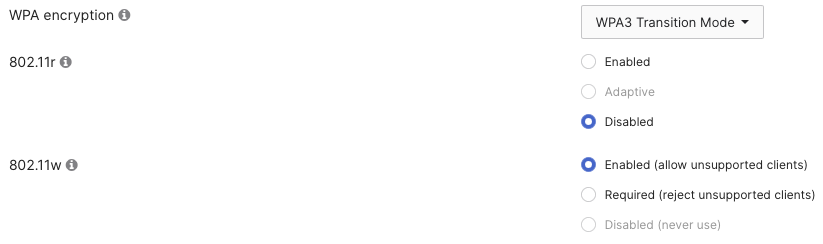 Within a few seconds the config is pushed to the AP and it’s now running in transition mode for this particular SSID.
Firing up Airtool and taking a quick capture on channel 36 (which was the channel my AP was operating on) only we can then quickly inspect the beacon frame sent from the AP to confirm that the SSID is operating as we configured it now.
Since even a quick capture will gather a lot of frames, and beacon frames are sent every 100ms you don’t generally need to filter for them, but in case it’s needed then you can narrow down your view with:
wlan.fc.type_subtype == 0x08
Expanding out the Wireless Management Information Elements we can inspect the RSN information. From here we can see that instead of the normal single AKM Suite listed we now have two, with both PSK and SAE apearing in the AKM List.
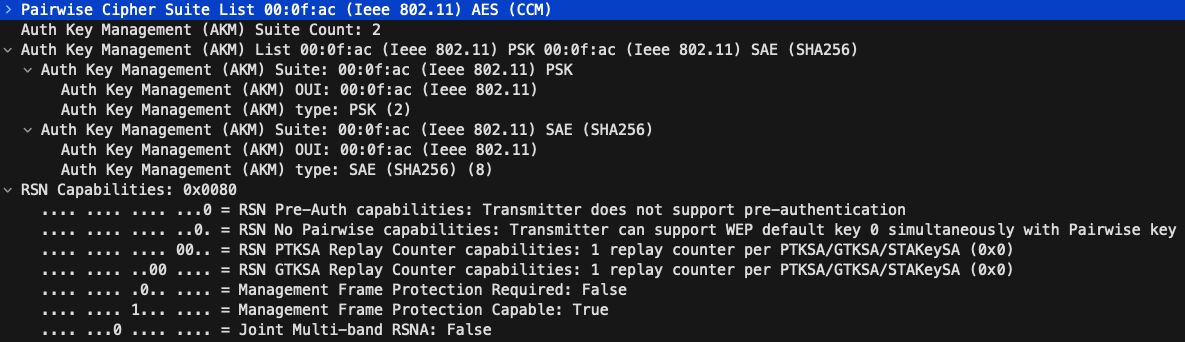 Further inspecting the RSN capabilities we can observe that PMF (802.11w) is mixed in that it is not required but is capable. This gives us the flexibility for both WPA2 (not required) and WPA3 (required) clients to connect.
Looking at the Authentication and Association frames we can filter things down with:
wlan.fc.type_subtype == 0x0b || wlan.fc.type_subtype == 0x00 || wlan.fc.type_subtype == 0x01
Inspecting the first Authentication Frame (always from the client to AP) we can see that this client is using WPA3 as the Authentication Algorithm is SAE.
 Jumping to the first Association Frame (again always from the client to the AP) the AKM list only contains the single element as only one method can be used.
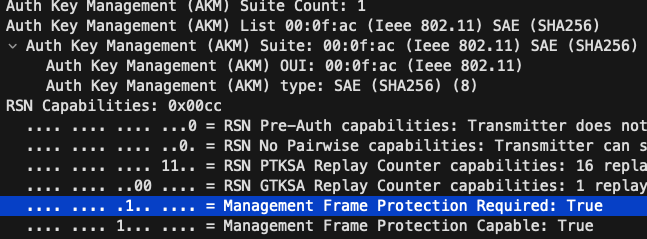 Here we can see that SAE SHA256 is being used and we can verify that PMF is set to required.
If this were a WPA2 client then we would instead see the AKM Type as PSK and more than likely the PMF flag would be set to False as generally if a client supports PMF then its probably because they had to to support WPA3 :-D
It’s important to consider if WPA3 transition mode is right for your deployment as there are known vulnerabilities related to it (Dragonblood) and also compatability issues, usually found in cheaper IoT devices that don’t handle having two AKM Suite options for example.
I’ve even seen laptops with outdated drivers that don’t handle transition mode as well. Updating drivers has resolved this, but it’s important to consider and test before deploying it to your environment.